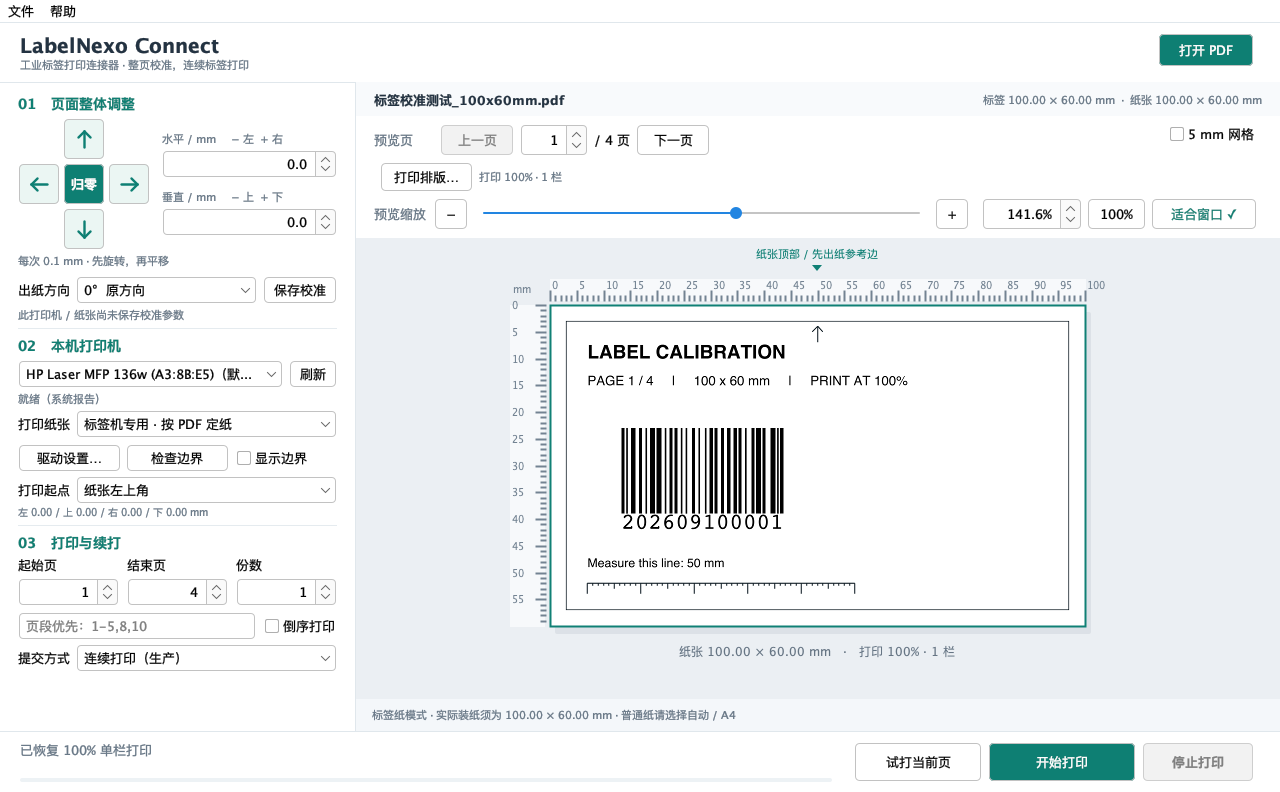
A PDF print-adaptation tool for label production. Keep the original file intact while adjusting position, orientation, multi-column layout and print jobs at the output stage.
Actual desktop interface · built-in sample100 × 60 mm
Preview before you print
Fine-tune in 0.1 mm steps
From a test label to a print run
BUILT FOR LABEL PRODUCTION
Final artwork.
Real production needs.
A practical link between finished PDFs and the label production line.
01
Print-position calibration
Correct placement without revising the template.
Compensate for horizontal and vertical offsets by moving the whole page in 0.1 mm steps. Save calibration for the printer and paper setup while preserving the original PDF.
02
Output-orientation adaptation
Match the artwork to the feed direction.
Rotate the printed content through 0°, 90°, 180° or 270° to suit paper loading and application requirements, without returning to the design file.
03
Multi-column page layout
Arrange existing pages for multi-column stock.
Arrange consecutive PDF pages across 1–4 columns, with a consistent scale, column spacing and output paper size. Preview or export the resulting layout before printing.
04
Production job control
Move from test prints to controlled production.
Choose page ranges, copies and submission mode; start or stop a run and restart from selected pages. Feed speed is set through the printer driver or device.
A SIMPLE WORKFLOW
Three steps. One focused tool.
Built around the moments that matter at the printer.
01
See the label first.
Open a PDF and check each page, its orientation and its dimensions. Rulers and zoom help you inspect the details before using a single label.
02
Put everything in place.
Rotate, scale or arrange columns, then adjust the whole page in 0.1 mm steps. Save the calibration for this printer and paper setup.
03
Print one. Then keep going.
Check a test print, choose the page range and copies, then start the run. Stop when needed and resume from the page you choose.
0.1 mm is the software adjustment step. Actual print placement depends on printer resolution, mechanics and the driver.
MADE FOR THE DESKTOP
Your files.
Your printer.
A familiar workflow.
Connect works with local files and printers installed on your computer. Keep the tools you use to create labels, and adapt their finished PDFs to the production setup.